
Bike audio too loud, voice too soft

broadstone

Wannabie Member
I’ve been growing my YT finance channel and thought it would be cool to talk finance while on the Harley. I have a decent Power De Wise Omni lav mic. I have an Arai Quantum X helmet. I've watched a few YT vids on mic placement but couldn’t find a spot behind the Arai cheek pad because of the helmet design. So I just tucked the mic inside a cheek pad space to test out the audio (see photo). I had the mic plugged into a Zoom H1 recorder with input set to 50% (probably too high I'm sure).

When I rode, the mic picked up too much of the Harley’s sound and my voice was muffled and too quiet. I tried with the vidor open and closed. The faster I rode the more bike noise the mic picked up. I figured I’d ask your opinion before I start buying more mic’s. Do you think this is because of the mic type or the helmet type?

Thanks in advance for your opinions
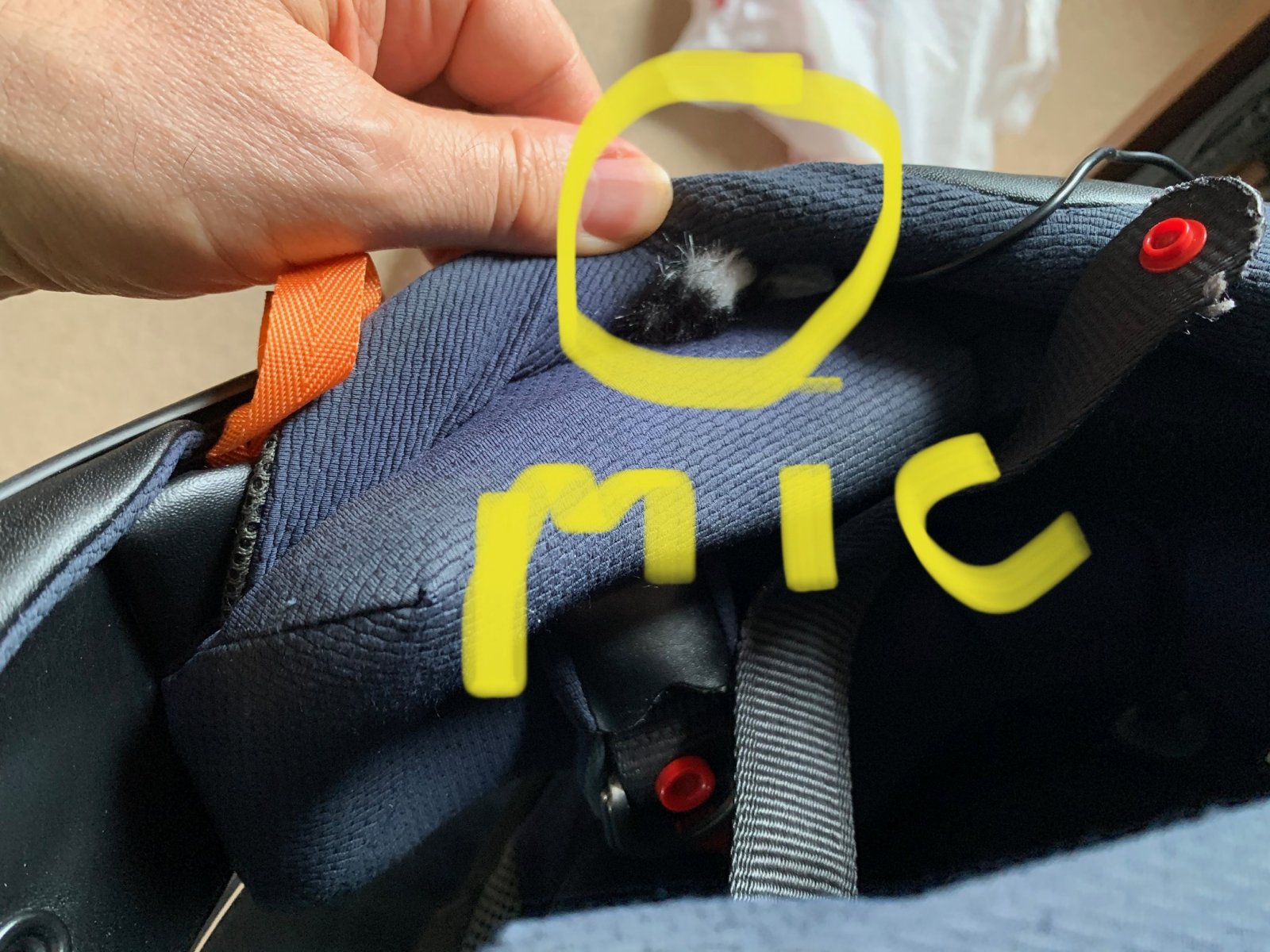
arai.jpg
 
Last edited by a moderator:
Mic is too far back and has little shielding underneath. Move it forward closer to your mouth. Tape it in there to try it if necessary.

Thanks. Unfortunately, I cannot move it further forward in the padding but I will try taping it to the front of the helmet next to the padding.
 
I’ve been growing my YT finance channel and thought it would be cool to talk finance while on the Harley. I have a decent Power De Wise Omni lav mic. I have an Arai Quantum X helmet. I've watched a few YT vids on mic placement but couldn’t find a spot behind the Arai cheek pad because of the helmet design. So I just tucked the mic inside a cheek pad space to test out the audio (see photo). I had the mic plugged into a Zoom H1 recorder with input set to 50% (probably too high I'm sure).

When I rode, the mic picked up too much of the Harley’s sound and my voice was muffled and too quiet. I tried with the vidor open and closed. The faster I rode the more bike noise the mic picked up. I figured I’d ask your opinion before I start buying more mic’s. Do you think this is because of the mic type or the helmet type?

Thanks in advance for your opinions

View attachment 5172

From my experience microphones pick up what’s there regardless of cost. If the engine / road noise is overpowering the voice then the mic needs to be closer to the voice, it’s a balance. I record my voice on the camera audio and the bike exhaust on a Zoom H5 then mix in post-production. Audio is a bugger to sort out, some folk seem to hit it straight away while others like myself struggle. Keep persevering.
 
I clamp my mic on the chin skirt of my helmet and have it set on a mid-level recording setting. I'm also using a dead cat to filter out any additional wind noise.

Depending on what editing program you're using, or if you have a separate audio editing program as well, you may be able to edit out any wind noise, but only at a reduced level.

You may have to do a set of test for the best mic placement and recording level for the desired results. If the bike noise is a problem, then it maybe better to stay on routes where you can travel at slower speeds to avoid higher engine sounds.

- Wolf
 
You might try adjusting the treble on the audio if the bike is putting out too much bass. When I was using Adobe premiere I had to boost treble 9 to 12 db and drop bass 6 db or else the bike was the star.

I am using PowerDirector 18 now and have to adjust my audio using the Sparkly EQ setting to keep the bike from being more noticeable than me.
:cool:
 
Yes, move the mic closer to your mouth, and with no contact with the lining of the inner shell.

Here is a pic of where I would look to place it in your helmet. I personally would cut a small hole right in the cheekpad at the bottom and feet the mic upinside between the outer lining of the cheek pad and the liner right in front of your mouth. This will secure it in place and remove the necessity of a wind sock since the cheek pad outerlayer will be the wind sock.

Or you can use another method to secure it to the cheek pad in fron of your mouth such as a lav mic clip, velcro or savety pin WITH a wind sock of some kind if not a few layers of them.

Also play with gain setting on the Zoom. Try about five different levels all on the same stretch of road, same words, cadance and volume to your voice and you will find the perfect setting.


AraiQuantumXhelmetmicplacement.jpg
 
Yes, move the mic closer to your mouth, and with no contact with the lining of the inner shell.

Here is a pic of where I would look to place it in your helmet. I personally would cut a small hole right in the cheekpad at the bottom and feet the mic upinside between the outer lining of the cheek pad and the liner right in front of your mouth. This will secure it in place and remove the necessity of a wind sock since the cheek pad outerlayer will be the wind sock.

Or you can use another method to secure it to the cheek pad in fron of your mouth such as a lav mic clip, velcro or savety pin WITH a wind sock of some kind if not a few layers of them.

Also play with gain setting on the Zoom. Try about five different levels all on the same stretch of road, same words, cadance and volume to your voice and you will find the perfect setting.


View attachment 5174
Ok thanks much, will give that a try. Is that an Arai Quantum X helmet?
 
What model HD do you ride and what exhaust do you have on it?

I have a Sportster with stupid loud V&H short shots and a Dyna Switchback with mellower but still loud V&H Monster Duals so I am well aquainted with the struggle of keeping the bike from stealing the show audio wise.
 
I have mine taped right in front of the cheek pad. I found I was more successful with adjusting the settings on my recorder. I turned the sensitivity all the way to low and fussed with a few other settings and found I got pretty decent audio. Record mode set to 128kbps, Mic sensitivity low, low cut - on. These settings did it for me.
 
I have mine taped right in front of the cheek pad. I found I was more successful with adjusting the settings on my recorder. I turned the sensitivity all the way to low and fussed with a few other settings and found I got pretty decent audio. Record mode set to 128kbps, Mic sensitivity low, low cut - on. These settings did it for me.

Thanks...which recorder do you use?
 

Winners Video

Website Supported by Ipswich SEO

Latest posts

Back
Top