
markgr1nyer
Wannabie Member
Hi
I brought VMSHDP off ebay the other day and it arrived yesterday (just waiting for the drift HD now)
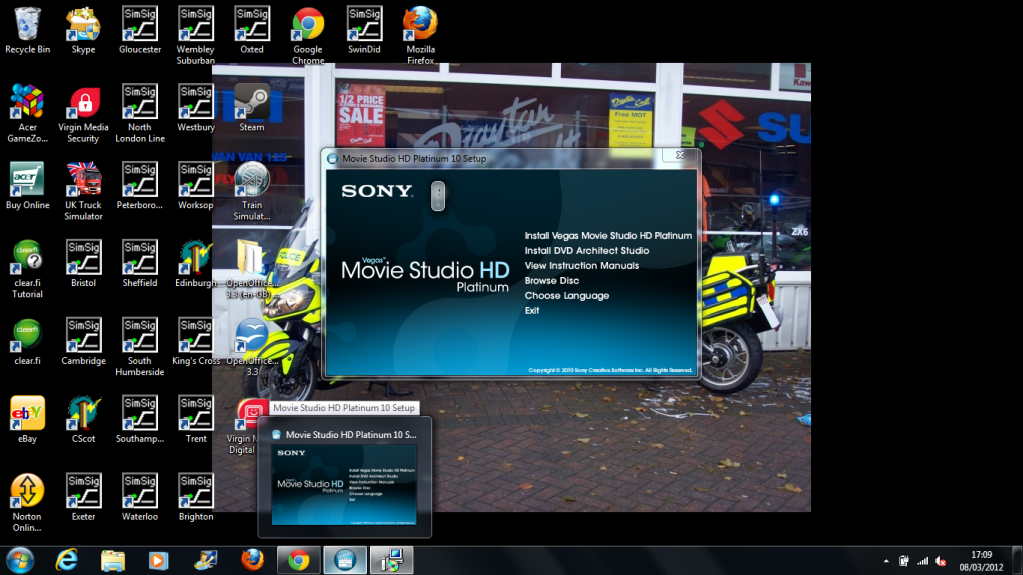
When I insert the CD/DVD into the disk drive it comes up with the initial setup menu, so I select install on the studio, and after about 10 seconds a little icon comes up in the bottom right corner with what looks like the first half of an s with a button below it. I want to install it onto a laptop (windows 7) ideally (has its faster and my own) but have also tried to install it on the family pc (vista) but I have the same issue. As soon as the icon appears the disk drive goes quiet. I have tried to maximize the window using the task manager as the only option when clicking the menu bar is to close the window (which it doesn't either). Looking at the processes it says CPU % is 0 and has 2,864k memory. I have also tried running the setup as an administrator (even though mine is the only user space on here) and nothing extra happens.
If the pic loads then the little thing to the right of the word sony is the little icon I get in the right corner
Please help
Mark
I brought VMSHDP
off ebay the other day and it arrived yesterday (just waiting for the drift HD now) When I insert the CD/DVD into the disk drive it comes up with the initial setup menu, so I select install on the studio, and after about 10 seconds a little icon comes up in the bottom right corner with what looks like the first half of an s with a button below it. I want to install it onto a laptop (windows 7) ideally (has its faster and my own) but have also tried to install it on the family pc (vista) but I have the same issue. As soon as the icon appears the disk drive goes quiet. I have tried to maximize the window using the task manager as the only option when clicking the menu bar is to close the window (which it doesn't either). Looking at the processes it says CPU % is 0 and has 2,864k memory. I have also tried running the setup as an administrator (even though mine is the only user space on here) and nothing extra happens.
If the pic loads then the little thing to the right of the word sony is the little icon I get in the right corner
Please help
Mark


