sony vegas rendering too big

Status
Not open for further replies.

misteroldschool

Wannabie Member
i just rendered a 5 minute video in sony vegas and it came out as 1gb, i made the same video in windows movie maker and its only 220mb, the vegas video is much better quality than the windows one but is there a happy medium in there somewhere? cause for the 1gb video youtube is saying a 556minute upload time :\ so ya is there any way to make vegas render videos in a smaller size?
 
misteroldschool said:
i just rendered a 5 minute video in sony vegas and it came out as 1gb, i made the same video in windows movie maker and its only 220mb, the vegas video is much better quality than the windows one but is there a happy medium in there somewhere? cause for the 1gb video youtube is saying a 556minute upload time :\ so ya is there any way to make vegas render videos in a smaller size?


in Vegas, render as .wmv @ 6Mbps.
 
My settings in Premiere Pro are:

4min vid = about 180Mb

Type: Video
Codec: H264 - MPEG-4 AVC (part 10) (avc1)
Bitrate Encoding: VBR, 1 Pass
Target Bitrate Mbps: 6
Max Bitrate Mbps: 9
Resolution: 1280x720
Frame rate: 30

Type: Audio
Codec: MPEG AAC Audio (mp4a)
Channels: Stereo
Sample rate: 44100 Hz

YouTube re-encodes it very fast, as the settings are almost identical.
 
matth1138 said:
in Vegas, render as .wmv @ 6Mbps.

i did this and it worked quite well, i also did MP4 and it worked well for making ti a small size but the quality was not so good, im going to try 3Mbps next time and see how that goes
 
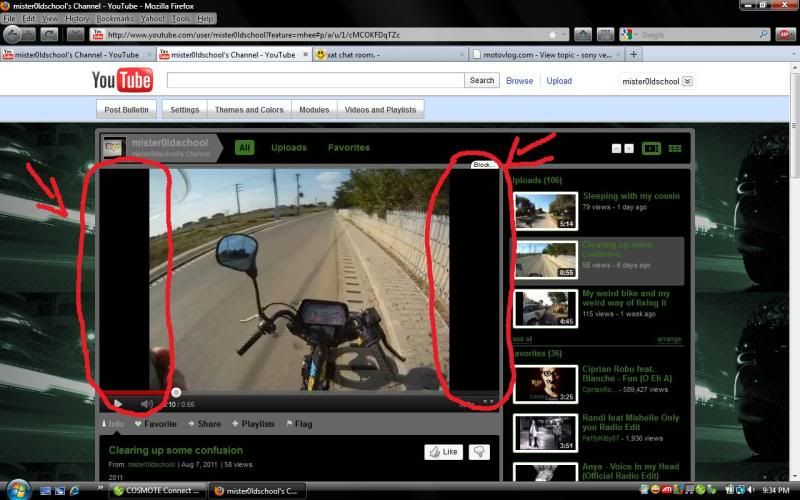
how do i make it widescreen(?) how do i make it so that the video takes up the entire screen not just the middle in other words?

blavk.jpg
 
a small part of the top and bottom of the screen is getting cut off for me, is this avoidable at all or should i just live with it?
 
misteroldschool said:
a small part of the top and bottom of the screen is getting cut off for me, is this avoidable at all or should i just live with it?


unless the camera has an option to record in 16:9 format this is unavoidable its one or the other im afraid :D
 
My widescreen is faked by unchecking "Maintain Aspect Ratio" it stretches it width ways and you lose the black bars.No ones ever seemed to notice and if they have, they havent commented. I also con YT into thinking my videos are HD by rendering them so...
You can also convert your final froduct to a .flv format which reduces size considerably, Vegas wont do this so use some 3rd party freeware. Keep experementing until you get it about right...

David
 
Status
Not open for further replies.

Winners Video

Website Supported by Ipswich SEO

Latest posts

Back
Top