
Setup help needed for a newbie

HayesMaker

Wannabie Member
Hi all, new to the forum and new to vloging... I know... Its going to be full or dumb questions so sorry in advance!

I have recently attempted to link my Cardo Packtalk Edge to my Drift Ghost XL Pro.

I have it kind of working but have two issues so far;

1) Camera Mic volume is incredibly low and Cardo is high. I know I could fix this with an attenuation cable or volume wire thing... But I was hoping to be able to just edit the two audio channels separately which leads me to issue 2...

2) My videos seem to be combining the two solo audios into 1 and I cannot separate them in DaVinci Resolve (I've been using YouTube for help but it doesn't work with my video files), when I try I just get left audio and right audio but both are exactly the same.

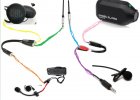
I have Cardo to Y cable
Speakers to Y cable (a)
Y cable (b) to aux cable
Aux cable to Breakout cable (a)
Camera mic to Breakout (b)
Breakout cable to Ghost xl

See pic for better idea of set up

Am I missing something with the files merging both audio signals? Am I going to have to lump out for an attenuation cable?
received_510784964348870.jpg
 
Without seeing what you're working with, and I am not 100% sure I understand what's going on, I'll say this:

It sounds like your 2 audio sources are combined into one stereo track, where one is Left and the other is Right.

You should be able to either split those Left/Right sources into their own tracks, or barring that, duplicate the audio tracks, use the Stereo Fixer (I think it's called) effect, and pan Left for the original and Right for the duplicate, and then adjust the levels from there.

-John
 
I imagine that it is just adding both inputs into the single audio channel, you'll not be able to separate them with your current setup.
It was my understanding that the Breakout cable (Hosa YMM-261 3.5mm TRS to Dual 3.5mm TS Female) would separate them Into stereo meaning I should have Comms as left and video as right
 
Without seeing what you're working with, and I am not 100% sure I understand what's going on, I'll say this:

It sounds like your 2 audio sources are combined into one stereo track, where one is Left and the other is Right.

You should be able to either split those Left/Right sources into their own tracks, or barring that, duplicate the audio tracks, use the Stereo Fixer (I think it's called) effect, and pan Left for the original and Right for the duplicate, and then adjust the levels from there.

-John
Hi John, that's what I expected to happen. Intercom should be the Left audio and Camera should be the Right audio channel. Instead, when I split the channels, both left and right are comms and camera combined.

What do you need to see to? The picture I posted has the items on but I could write it down if needed.
 
Hi John, that's what I expected to happen. Intercom should be the Left audio and Camera should be the Right audio channel. Instead, when I split the channels, both left and right are comms and camera combined.

What do you need to see to? The picture I posted has the items on but I could write it down if needed.
After your response - nothing more. I was referring to the timeline in Resolve, specifically in the Fairlight tab.

BUT, you answered the question - it looks like your audio streams are combined, not on distinct Left and Right channels like I was hoping [and my solution was geared for].

I think the breakout cable is probably going to be your best bet.

-John
 
After your response - nothing more. I was referring to the timeline in Resolve, specifically in the Fairlight tab.

BUT, you answered the question - it looks like your audio streams are combined, not on distinct Left and Right channels like I was hoping [and my solution was geared for].

I think the breakout cable is probably going to be your best bet.

-John
No problem, the odd thing is, I'm already using a breakout cable so I'm wondering if it's the Drift camera combining them so my original plan is foiled. In the video where I found the setup, the chap is using a GoPro not a Drift so it could be that.
 
No problem, the odd thing is, I'm already using a breakout cable so I'm wondering if it's the Drift camera combining them so my original plan is foiled. In the video where I found the setup, the chap is using a GoPro not a Drift so it could be that.
If the Drift only has mono audio, that would make sense to me. I'm not sure if GoPros have stereo or not.

-John
 
1677873658691.png


So, I pulled up Resolve, and in the Fairlight tab, I made the audio track really tall, and I see this - which leads me to believe that when a GoPro is connected to a Media Mod for external audio, it comes in as mono and is then split to L/R channels, but they're the same.

It may be easier in your case to record to 2 devices, sync them up in your editing software, and then set the levels so they're equal.

-John
 
View attachment 6635

So, I pulled up Resolve, and in the Fairlight tab, I made the audio track really tall, and I see this - which leads me to believe that when a GoPro is connected to a Media Mod for external audio, it comes in as mono and is then split to L/R channels, but they're the same.

It may be easier in your case to record to 2 devices, sync them up in your editing software, and then set the levels so they're equal.

-John
So strange as I've seen videos of people doing it in Resolve with this set up. I'm going to try different set up with a second mic next to the speakers instead of linking them.
 
Your cable arrangement is correct. Most people use the wrong cable going into the camera: a Y-cable instead of a splitter. For seperate channels you must use a stereo to dual mono splitter.

Can the Ghost XL Pro even record stereo? Does the splitter actually do what it should? Try it out seperately with a left/right test track.
 
Your cable arrangement is correct. Most people use the wrong cable going into the camera: a Y-cable instead of a splitter. For seperate channels you must use a stereo to dual mono splitter.

Can the Ghost XL Pro even record stereo? Does the splitter actually do what it should? Try it out seperately with a left/right test track.
I'm beginning to think the ghost cannot haha. I ended up going with a mic next to my speaker instead, but now it doesn't seem to pick up the speaker audio unless on full ‍♂️
 
Okay, quick update, the setup all works in my PC and I can edit the separate audio tracks... So Drift Ghost XL Pro is recording mono audio. Not really sure how I can use this setup and make the comms feed quiet enough?

(the photo is after I turned comms volume down and increased the Mic's up)
 

Attachments

  • 20230306_212023.jpg
    20230306_212023.jpg
    177.4 KB · Views: 118
You can use an inline volume regulator to set the audio roughly the same level but two signals on one track is always rubbish. Of all the cameras I've tried so far only Sony and GoPro seem to be able to record stereo. Insta360 nope, Drift nope.
 
You can use an inline volume regulator to set the audio roughly the same level but two signals on one track is always rubbish. Of all the cameras I've tried so far only Sony and GoPro seem to be able to record stereo. Insta360 nope, Drift nope.
Thats disappointing! I need to carry on with my double mic to camera method then, just can't get it to pick up on the speaker mic very well :(
 
I have published english subtitles on my tutorial video. Maybe that helps.

Here is a link to the thread where I shared that video:

 
Last edited by a moderator:
I give up.

I bought the inline volume control, but now the footage will only record mic, not picking up the Cardo stuff.

I also tried two mics, 1 next to my speakers but again, the cam only seemed to pic up 1. It seems the Drift Ghost XL Pro cannot take two audio inputs at the same time so I've called it quits. I've spent too much money and gotten too frustrated to carry on with it. Can't afford a GoPro after just buying the Ghost. I can't believe something that should be so simple is such hard work!
 

Winners Video

Website Supported by Ipswich SEO

Latest posts

Back
Top