What Archiving Schemes Do You Use For Footage?

Happo

Wannabie Member
I'm curious what allot of you long time vloggers do with all the footage that you have. Going forward, I plan on having the camera running every time that I get onto the bike at 1080@60fps. Obviously, that is going to be a ton of video and space, with most of the video being almost useless.

Do you keep all your footage? How much do you keep? Do you delete older unused footage after a certain amount of time? If you keep the raw footage (and projects) or just the completed ones you upload to YT? How much storage do you maintain for stuff like this.

Current plan is that when I get home after almost every ride (depending on motivation), cut up the video so that only the interesting bits are kept ( plus ~1 minute before and after the event ). Event could be described as an asshole driver, my own fuckup, or a really nice segment of video.
 
I've got a 1TB external that's starting to look a bit fat from on and off vlogging. Im going to just have to trash older footage I think, especially if I upgrade cameras.
 
While I run my gopro anytime I am riding I only save what I am going to use in my motovlog. Or any random events I happen to notice. I normally wipe my memory card every few days and leave it at that.
 
I have a batch script to incrementally archive all my data to a 12TB NAS daily.

So you save everything? Have you ever gone back and tried to create new content from it? ( Ie. Have you found it useful to go back and reference these videos? )
 
So you save everything? Have you ever gone back and tried to create new content from it? ( Ie. Have you found it useful to go back and reference these videos? )
I've only just started, but I plan on going back to make best bits and progression demonstration videos as I go.
 
I've got a 1TB external that's starting to look a bit fat from on and off vlogging. Im going to just have to trash older footage I think, especially if I upgrade cameras.

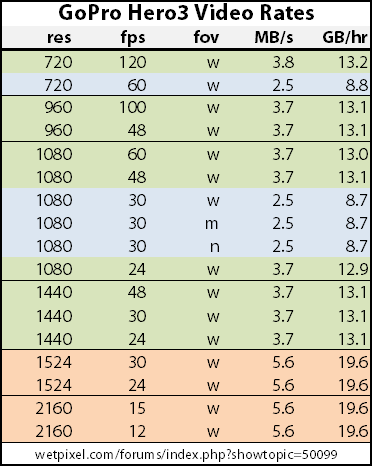
Been doing a little research and based off this chart, it looks like 1TB would be around 76 hours of video at 1080@60fps. Not too bad really.

GoProHero3VideoRates.png
 
Once I've finished and published vlog, I re-render all my source files the same as I upload to YT (8mb/s) and archive that on a pc and external storage.
Re-rendering them will brings a 20min/4Gb file down to ~1.5Gb.

I don't plan to re-use the footage, but it's there if I want it. Has come in useful once or twice.

After I have the YT version, I re-render at 720/30/5mbs for a vimeo upload.
I keep that 720 version locally just as a reference. I can re-render the 1080 again if I really need it ;)

After doing this for 2 years, my archive is about 340Gb
 
In the beginning, I didn't save any of my YouTube video files because of a small hard drive, to which I now regret ~_~ . Since I started saving, I just save the file I plan to upload to YouTube after it's been encoded. Any loose, raw video files from my camera usually go to the trash because they've been used and I don't need them anymore :p . Anything else that I haven't used, I may keep on a separate HDD for future use (raw camera files).
 
I'm curious what allot of you long time vloggers do with all the footage that you have.

Sorry officer I don't keep backups of that video you saw on YouTube.... ;)

I have about 2TB of video backed up, yes I have lots of storage space. All I do is make a folder after a ride/download and name it what ever and dump the entire card into it. Then Premiere will let me know what ones I have used in what movies etc etc. I could then in theory go and trash the rest but I just can't be bothered. :)
 
In the beginning, I didn't save any of my YouTube video files because of a small hard drive, to which I now regret ~_~ . Since I started saving, I just save the file I plan to upload to YouTube after it's been encoded. Any loose, raw video files from my camera usually go to the trash because they've been used and I don't need them anymore :p . Anything else that I haven't used, I may keep on a separate HDD for future use (raw camera files).

Yeah. That's sort of my worry with this is loosing some videos that I might want to have kept.
 
I chop it up when I get a chance as I only really vlog when out for a ride, my commute is short and uninteresting mainly. Those chopped bits get saved and the rest is binned. Then I go through what I'll keep for the video and the rest just goes to a "random clips" folder. Works for now but I'll need an external HDD soon I reckon.
 
I used to save everything but filled up a 1Tb external in no time, now also have a 4Tb external.
I still film all the time - partly for insurance and partly in case something happens that would be of interest. Running 2 cameras on a dual vlog with Wifey, at 720/60 so it mounts up.
I keep a written index of my footage, review it asap after the ride (if something is on there I want to keep, otherwise just dump it) and put it in files named by date and a short description. I have found this to be enormously helpful when editing, likewise - if I don't get around to reviewing and making brief notes on footage it is a lengthy process to edit a vlog from it.
 
At the moment I'm storing everything.. Once disk space is running low I'll start from the bottom of the pile and start deleting
 
I store everything I believe is worth keeping , by date in folders (since a file is 5 minutes and there are many files + the audio files from my phone) but once I reach 100 gigs or so I go and see why I saved them. If I like it , I render the part I liked and delete the source files. If I don't I just delete them.

Saves me a huge amount of time when I decide to make a video.
 
On too many external hdd's... I know one will fail. I just hope the future holds easy access to 10TB+ drives, so space will never ever be a concern ever again.
 

Winners Video

Website Supported by Ipswich SEO

Latest posts

Back
Top